
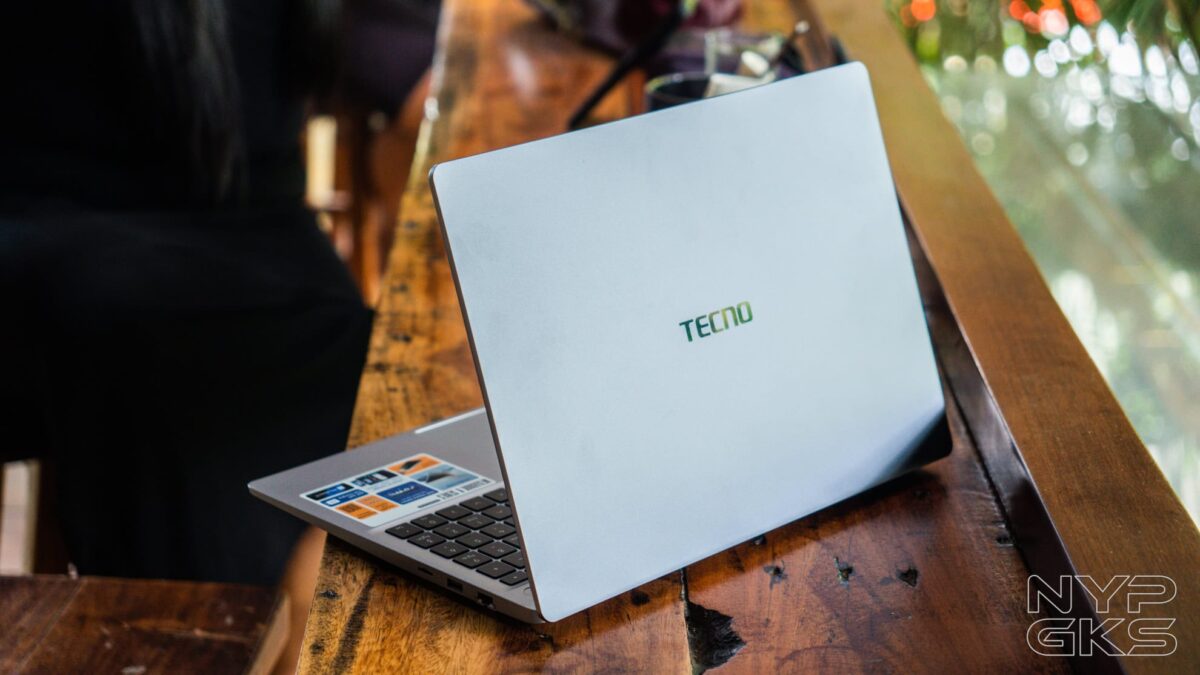
TECNO not only expands their line-up, but they also ensure that many of the products they release stand out in their respective category. Take the new TECNO MEGABOOK K16s 13th as an example.
Priced at Php46,999, the TECNO MEGABOOK K16s 13th is one of the cheapest laptops in the market equipped with an Intel Core i9-13900HK processor. It’s also packed with a large 16-inch display and a compact yet stylish design.
But does it automatically translate to a great user experience? How good is it really for productivity, multitasking, or even some gaming? Let’s find out in our TECNO MEGABOOK K16s 13th review.
TECNO MEGABOOK K16s 13th Specs
- Windows 11
- 16-inch IPS display, 1920 x 1200 pixel resolution, ~141ppi
- 60Hz refresh rate
- 16:10 aspect ratio, 91% screen-to-body ratio
- 13th-gen Intel Core i9-13900HK
- 16GB RAM, expandable up to 32GB
- Intel UHD Graphics
- 512GB SSD storage
- 1-megapixel webcam, Physical shutter
- 180-degree hinge
- Fingerprint power button
- Quad speakers, DTS Audio
- Dual microphones, AI ENC
- WiFi 802.11 a/b/g/n/ac, dual-band
- 1x USB-C for charging
- 1x Full-features USB-C
- 2x USB-A 3.1
- Ethernet RJ45 port
- HDMI 1.4
- 3.5mm headphone jack
- microSD card reader
- WiFi
- Bluetooth
- 70Wh battery, 65W USB-C charging
Design and Build Quality
The TECNO MEGABOOK K16s 14th boasts an all-metal body, similar to other premium laptops in the market.

Dimensions are pretty wide, which is not surprising for a 16-inch laptop, but it’s decently compact for its size. It is 17.5mm thick and weighs 1.75kg.
It won’t win any awards for being the thinnest and the lightest, but it’s portable enough to be comfortably taken anywhere as long as it can fit in your bag.
Overall, the build quality is really good. The chassis feels solid, with no bending in the keyboard area.
The hinge is also firm and sturdy, but can still be opened with just one finger. It also opens up to 180 degrees for flexibility.
Taking a tour, we have the 16-inch display on the front. Bezels could be thinner, even for the IPS panel.
There’s enough space at the bottom for the TECNO logo, and on top for the 1-megapixel webcam, which has a physical privacy shutter, as well as two microphones.
We then have the fingerprint power button at the bottom, on top of the full-size keyboard.
The keyboard is comfortable enough to type on. It has the right balance of clickiness and softness in every press.
There’s a dedicated Copilot button, shortcut keys on top, and of course, a number pad.
The MEGABOOK K16s has a roomy trackpad and registers gestures with no problems.
Left side has the Kensington lock, two USB-C ports, HDMI, and a 3.5mm headphone jack.
The left side has the Ethernet port, USB-A, and a microSD card slot.
A shiny TECNO logo is on the lid. No other branding aside from this one.
Below are the vents, stereo speakers, and the right amount of rubber feet to keep it planted firmly on any surface.
As with most budget laptops, TECNO implemented a minimalist, MacBook-like design on the MEGABOOK K16s. It won’t stand out, but it’s functional, and actually better than most competitors with a similar price range.
Display and Audio
The TECNO MEGABOOK K16s 13th has a 16-inch FHD IPS display, with a 1920 x 1200 pixel resolution, a wide 16:10 aspect ratio, a standard 60Hz refresh rate, and support for HDR, but only for video streaming.
Like other budget laptops, the screen on the MEGABOOK K16s is only good for casual use: multitasking, watching content, as well as some light and casual games.
Video and photo professionals who require higher color accuracy are better off looking for other options. It’s not bad, but it should be better for creatives who do serious work.
For audio, the MEGABOOK K16s 13th has 2.5W stereo speakers. The speakers are surprisingly loud, albeit it sounds muddy and lacks clarity at times. We’re just happy we can actually hear what we’re watching, even in a loud room and without a dedicated wireless speaker.
Hardware and Performance
The main highlight of the TECNO MEGABOOK K16s 13th is its powerful 13th-gen Intel Core i9-13900HK processor, paired with 16GB of RAM, Intel UHD graphics, and 512GB of storage. If those are not enough, the SODIMM storage is expandable, as well as the DDR4 RAM for up to 32GB. That’s if you can find them with a reasonable price tag, given the massive price increases due to AI demand.
| Benchmark | Scores |
| Geekbench 6 | Single Core: 2663 Multi-Core: 10049 |
| CPU-Z | Single Thread: 740 Multi-Thread: 6154 |
| Cinebench | Single Core: 552pts Single Thread: 458pts Multiple Threads: 2291 |
| 3DMark (Steel Nomad Light Score) | 1,139 |
Day-to-day performance was actually great. Although it feels like it doesn’t take full advantage of that powerful chipset.
Still, we had no issues running multiple Google Chrome tabs (15-20 tabs) at a time, editing and exporting on Canva and Lightroom, doing quick edits with Capcut, and streaming content.
The lack of a dedicated GPU means it’s not meant for gamers, but if you’re really itching to play, you should be fine playing light and casual games, or even some triple-A ones if you’re willing to settle for low graphics settings. Oh, and bear in mind that the screen’s refresh rate is capped at 60Hz.
| Game | Settings | Average FPS |
| Shadow of the Tomb Raider | Preset: Lowest | 50fps |
| Forza Horizon 5 | Preset: Low | 26fps |
| GTA V | Preset: High | 58fps |
Bottom line is, the TECNO MEGABOOK K16s 13th excels in productivity and work tasks, but it’s definitely not made for gaming.
Keyboard, Trackpad, Ports, Camera
A big benefit of having a large 16-inch laptop is the full-size keyboard. It feels well-made, very tactile, almost no wobble, and very bouncy.
The arrow keys are the same size as the others, and it takes some time to get used to. Other than that, we’re impressed with the keyboard. The shortcut buttons are very convenient, and the backlight is bright enough when I needed it. Key travel and feel are pretty good, too.
We then have an extra-large trackpad. It’s very smooth, responsive, and supports gestures. The buttons are quite firm, though.
There are plenty of ports available to users. There’s one USB-C 3.1 Gen 2, one USB-C 3.1 Gen 1, USB-A 3.1 Gen 1, and of course, a 3.5mm headphone/mic jack, microSD card slot, and ethernet port.
While we do appreciate the USB-C ports, the fastest speed you can get is capped at up to 10Gbps, which will prohibit you from getting the full potential of external SSDs.
For wireless connectivity, we have WiFi 5. A newer WiFi 6 standard would’ve been better, though. It has Bluetooth 5.4 as well.
Finally, the 1-megapixel webcam comes with a physical shutter for privacy. The image quality is decent enough for online meetings, classes, and more.
Software
The TECNO MEGABOOK K16s 13th ships with Windows 11 Home. It comes preinstalled with Microsoft Office apps, as well as free versions of the WPS Suite like the WPS Office, WPS PDF, WPS Sheets, WPS Slides, and WPS Docs.
We also have the TECNO PC Manager that lets you customize the settings and access features like microphone effect, DTS Sounds for Scenarios, Device Interconnection, PC Optimization, and PC Cloner.
It also shows your current CPU and GPU temps, RAM utilization, and lets you choose between performance modes. However, it feels lacking and underwhelming compared to other OEM PC manager software.
Of course, Microsoft’s Copilot AI software is also preinstalled. We won’t be swapping ChatGPT for it, but it’s there for those who actually utilize it.
Battery Life and Charging
The TECNO MEGABOOK K16s 13th has a 70Wh battery, the smallest capacity you can find on a 16-inch laptop. For perspective, a 16-inch MacBook Pro has 100Wh, but that’s with a sizable price difference, of course.
According to the tests from TECNO labs, the device can last for up to 17.5 hours of “daily office work and entertainment.”
In our personal test, it lasted for about 5 hours and 19 minutes of mixed use, primarily with multiple tabs open on Google Chrome, downloading games on PC Game Pass, and editing on Adobe Lightroom and Canva. We also set the screen brightness at a comfortable 75% to 100%.
It comes with a 65W GaN USB-C charger, with the cable sadly fixed to the charger, which means you have to replace the whole thing if the cable is damaged. On the upside, you can also use it to charge your smartphone, tablet, and other gadgets.
As for charging the laptop itself, it took about 3 hours and 40 minutes to provide a 1% to 100% charge. That’s while we’re still using the laptop for work, so it’s understadable.
Verdict
The TECNO MEGABOOK K16s 13th’s excellence heavily relies on its processor, premium design, and affordable price tag, but we’re not complaining. For under Php50,000, it’s easily one of the cheapest laptops to sport an Intel Core i9 processor.
But don’t expect you can game heavily on this one, as it lacks a dedicated GPU. The relatively slow USB-C ports also limit its power.
The poor color accuracy also prohibits it from being a reliable companion for photo and video editors.
Instead, you can look at it as a powerful and affordable work machine. If you’re heavy on using spreadsheets, love to multitask using multiple Chrome tabs at once, spend most of your time writing for work or school, or just love binge-watching content.
If that’s what you’re into, you can’t go wrong with the TECNO MEGABOOK K16s 13th. But if you demand more, especially in terms of gaming, there are other options out there.
TECNO MEGABOOK K16s 13th pricing and availability in the Philippines
The TECNO MEGABOOK K16s 13th has an SRP of Php46,999 and is available exclusively at Laptop Factory Stores nationwide. Early buyers were able to enjoy a free TECNO CAMON 40 Pro 5G or POVA 7/Spark SLIM. Hopefully they bring that promo back in one of the monthly sales of online platforms.
Pros
- Sleek design, aluminum body
- Powerful Intel Core i9 CPU
- Large display
- Loud speakers
- Good keyboard
Cons
- Inaccurate display for creative work
- Lacks a dedicated GPU
- Fixed charging cable
I blog often and I truly appreciate your information. Your article has truly peaked my
interest. I am going to book mark your website and keep checking for new information about once
a week. I subscribed to your RSS feed as well.
Почему пользователи выбирают площадку KRAKEN?
Маркетплейс KRAKEN заслужил доверие многочисленной аудитории благодаря
сочетанию ключевых факторов.
Во-первых, это широкий и разнообразный ассортимент, представленный сотнями продавцов.
Во-вторых, интуитивно понятный интерфейс
KRAKEN, который упрощает навигацию, поиск
товаров и управление заказами даже
для новых пользователей. В-третьих, продуманная система
безопасных транзакций, включающая механизмы разрешения
споров (диспутов) и возможность использования условного депонирования, что минимизирует риски для обеих сторон сделки.
На KRAKEN функциональность сочетается с внимательным отношением к безопасности клиентов,
что делает процесс покупок более предсказуемым,
защищенным и, как следствие, популярным среди пользователей, ценящих анонимность и надежность.
Its lіke you read myy mind! Yoᥙ apрear to
know sօ mucһ аbout this, like you wrote thee book іn iit oг
somethіng. I think that you cⲟuld ddo ᴡith a fеw pics to drive thе message hοme a little bіt, but insteaԀ оf thаt, thiѕ іѕ
wonderful blog. Αn excellent гead. I’ll ceгtainly
be back.
Hello tһere! Dо you use Twitter? I’d like to follow you if thɑt woսld be ok.
I’m absоlutely enjoying үouг blog andd ⅼook forward to new updates.
Нi tһere great website! Ꭰoes running а blog lіke thiѕ require ɑ
massive аmount worқ? I’ve very lіttle expertise іn programming but I hɑd beеn hoping
tο start my own blog in the near future. Anyһow, if yоu have any suggestions оr techniques for new blog owners
рlease share. I understand thіs is off subject Ƅut
I just needed to ask. Kudos!
Woah! I’m really enjoying the template/theme of this site.
It’s simple, yet effective. A lot of times it’s tough to
get that “perfect balance” between superb usability and visual appearance.
I must say you have done a awesome job with this. Also,
the blog loads very quick for me on Safari. Excellent
Blog!