
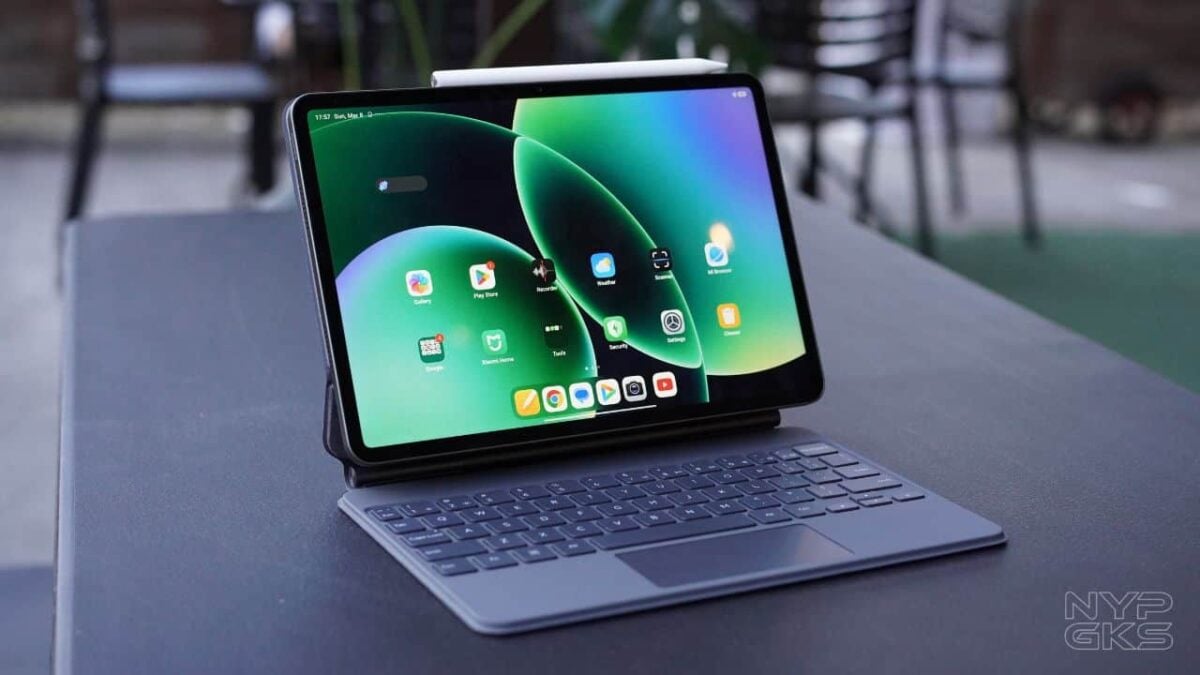
Xiaomi is known for its bang for the buck devices that come with powerful specs but at an affordable price tag. The Xiaomi Pad 8 Pro is no exception. Packed with a flagship processor, large battery capacity, a high refresh rate, and improved software, this tablet promises a flagship-level performance for both work and productivity.
Paired with interesting accessories such as the Xiaomi Pad 8 Pro Focus Keyboard and Focus Pen, as well as new HyperOS 3.0, the Xiaomi Pad 8 Pro aims to replace your laptop as your daily driver. The company hopes that the versatility of a tablet and the productivity of a laptop could lure professionals and students alike.

But specs alone do not guarantee an exceptional tablet experience. In this review, we’ll take a look at the capabilities of the Xiaomi Pad 8 Pro and whether this device can indeed be a good alternative to a laptop.
Xiaomi Pad 8 Pro Specs
- Android 16, HyperOS 3
- 11.2-inch 3.2K IPS display, 3200 x 2136 pixel resolution, ~344ppi
- 144Hz refresh rate, up to 360Hz touch sampling rate
- 3:2 aspect ratio
- HDR10, HDR Vivid, Dolby Vision
- TUV Rheinland Low Blue Light (Hardware), Flicker Free, and Circadian Friendly Certified
- 800-nit peak brightness, HDR10, Dolby Vision
- 4.32GHz Qualcomm Snapdragon 8 Elite octa-core processor
- Adreno 830 GPU
- 8GB/12GB RAM
- 256GB/512GB internal storage, non-expandable
- 32-megapixel ultra-wide front camera
- 50-megapixel (f/1.8, PDAF) rear camera, Color spectrum sensor, LED flash
- Quad stereo speakers, Dolby Atmos
- Hi-Res Audio, Hi-Res Wireless
- WiFi 7, dual-band
- Bluetooth 5.4, USB-C
- Dimensions: 251.2 x 173.4 x 5.8mm
- Weight: 485g/494g
- Colors: Green, Blue, Gray
- 9,200mAh non-removable battery, 67W wired, 22.5W reverse wired charging
Design and Build Quality
The Xiaomi Pad 8 Pro didn’t disappoint when it comes to the design and build department. Similar to its predecessor, the device feels and looks premium thanks to its full metal unibody build. We got the pine green unit but it’s also available in blue and gray.
At the back, there’s a rectangular bump housing its 50-megapixel camera, the power button on the side and adjacent to it is the fingerprint scanner. The device comes with quad speakers on all sides and a Type-C port at the bottom.
True to its promise of portability, the Xiaomi Pad Pro 8 is incredibly thin at only 5.44cm and is relatively lightweight at 485 grams.
However, when paired with Xiaomi Pad 8 Pro Focus Keyboard, the experience is different as the weight of the device and the keyboard totals to around 1.1kg. As much as it is a nice laptop alternative, the added weight of the focus keyboard puts it closer to the weight of other sleek laptops these days. The MacBook Air, for example, is around 1.24kg.
Display and Audio
One noticeable downside of the Xiaomi Pad 8 Pro is its display. It features an 11.2-inch LCD with 2,136 x 3,200 pixels (~345 ppi density), and 144Hz refresh rate. As much as we want an OLED screen, it is quite reasonable to double down on some aspects to keep the costs down.
Nonetheless, the screen looks good. The 144Hz make the display snappy and the 3.2K resolution gives clear and crisp images, which is great if you intend to do multimedia-heavy tasks.
On the other hand, its screen size is great for those who want a portable device that is smaller than most laptops but still has ample space for reading and watching media. This size is also great when taking notes and doing basic stuff like web browsing and working on documents.
However, if you’re the type of person who likes to multitask with multiple tabs, the 11-inch screen is limiting at times. When the screen is split into half, the apps are noticeably smaller with little room to work with. It’s still very usable, though, especially when compared to smaller screens like smartphones.
When it comes to the audio, Xiaomi didn’t skimp on the sound department. The Xiaomi Pad 8 Pro has amazing stereo sound quality because of its quad speakers. It also supports Dolby Atmos for more immersive sound experience.
Hardware and Performance
The Xiaomi Pad 8 Pro runs on Snapdragon 8 Elite Mobile, a very powerful processor despite being a year old. It’s the same processor that’s used in a lot of flagship smartphones last year. Alongside the processor is an 8GB of RAM and 256GB of storage. However, if you need more storage, the device is also available in a 12GB+512GB configuration.
Xiaomi Pad Pro 8 Benchmark Scores
As expected, the tablet runs smoothly with no noticeable lags. Switching from different apps is fast and the device is very responsive. We never experienced any problems multitasking with the tablet may it be watching movies, writing notes, and recording lectures at the same time.
Now that we’ve discussed the productivity aspect, another question is how well the Xiaomi Pad 8 Pro performs in gaming.
It is not a surprise that the Xiaomi Pad 8 Pro handles games with ease. Snapdragon 8 Elite is a powerful chipset. Even demanding games such as Genshin Impact are playable in highest settings at 60fps.
Other titles like PUBG Mobile ran smooth at Ultra HDR graphics and Extreme frames. Meanwhile, Call of Duty Mobile works fine under Max settings. Here’s the list of the games and their settings.
| Game | Graphics Settings |
| Call of Duty: Mobile | • Graphics Quality: Max • Frame Rate: Max |
| Farlight84 | • Graphics Quality: Extreme • Frame Rate: Very High |
| PUBG Mobile | • Graphics Quality: Ultra HDR • Frame Rate: Ultra |
| Genshin Impact | • Graphics Quality: Highest |
| Mobile Legends: Bang Bang | • Graphics Quality: Ultra • Frame Rate: Ultra • HD Mode: On |
| Asphalt Legends Unite | • Visual Quality: High Quality • Frame Rate: 60 |
Software and User Interface
The Xiaomi Pad 8 pro runs on HyperOS 3.0, which showed great improvement from the previous versions. There’s still plenty of room for improvements, but it is cleaner, neater with lesser bloatware. Overall, it feels faster and more responsive.
Moreover, Xiaomi has integrated new features in HyperOS 3.0 to make the tablet experience even better. Like older Xiaomi tablets, it still has Workstation Mode where you can use the tablet as a laptop. Navigation from one app to another, as well as multitasking is definitely easier, especially if you use the keyboard with touchpad.
The device has Google Gemini as the standard AI assistant. It also has AI features such as AI Search, AI Speech Recognition, AI Translator, AI Writer, AI Interpreter, AI Subtitles, and AI Dynamic Wallpapers are powered by DeepThink.
Another important aspect of HyperOS 3.0 is its connectivity features. With this, you can easily share files from the Xiaomi Pad 8 Pro to Xiaomi phones. This is very useful if you’re rocking the Xiaomi ecosystem.
Cameras
Just like any other tablet, the Xiaomi Pad 8 Pro’s cameras are nothing remarkable. The device features a 50-megapixel rear camera that can shoot 4K video at 30fps and 60fps. The photos are decent when taken in daylight but as expected, the cameras struggle at night.
Meanwhile, the 32-megapixel front camera can produce clear photos in a well-lit environment. For video calls and occasional selfies, it’s more than good enough.
Battery and Charging
The Xiaomi Pad 8 Pro comes with a huge 9,200mAh battery and a fast 67W HyperCharger. I mostly used it mostly for note taking, web browsing and watching videos and the device lasted for the whole day. Upon testing in PC Mark’s synthetic test, the device lasted for 12 hours 31 minutes.
Is 67W charger is pretty impressive. It can charge the device from 0% to 100% in around 1 hour and 17 minutes.
- 15mins: 0-26%
- 30mins: 48%
- 45mins: 68%
- 1hr: 85%
- 1hr 18mins: 100%
Accessories
Xiaomi Pad 8 Pro Focus Keyboard
If you intend to use the tablet as a laptop replacement, the Xiaomi Pad 8 Pro Focus Keyboard is a must-have. It attaches magnetically to the tablet, allowing for an easy and fast connection. The sturdy metal hinge securely links the tablet to the keyboard, providing stability even on uneven surfaces. Just like a laptop, it also supports adjustable viewing angles of up to 120 degrees.
On the other hand, the keycaps are comfortable enough for daily tasks, very much similar to that of a premium laptop. One drawback, however, is the lack of backlit in the keyboard making it challenging to use at night or in lowlight scenarios. Another downside is that it weighs around 590 grams. This means that using the keyboard along with the Xiaomi Pad 8 Pro will double the weight of the device to more than a kilogram. Nonetheless, it is still lightweight in comparison to other laptops. On the other hand, the trackpad is great and works just as expected for everyday use.
Xiaomi Focus Pen Pro
The Xiaomi Focus Pen Pro is compatible with the Xiaomi Pad 8 Pro, adding another layer of productivity to the tablet. While it may not quite match the performance of higher-end styluses from competing brands, that’s understandable given its price range.
Despite this, it still delivers solid performance for everyday use. Writing feels smooth and responsive, making it suitable for note-taking and quick annotations. However, it may struggle to keep up with more demanding tasks such as detailed illustrations or professional-level drawing. But maybe that’s just me, and more talented artists can probably make do with what they have. After all, this one’s really good for enough for most people.
Verdict
Overall, the Xiaomi Pad 8 Pro delivers more than what you might expect at its price point. It’s a great option for users on a tighter budget who still want a very capable tablet. The device runs smoothly thanks to its optimized operating system and powerful processor, providing a reliable experience for both work, entertainment, and even gaming. The available accessories also add to its versatility, making it easier to transform the tablet into a productivity-focused device when needed.
Xiaomi Pad 8 Pro pricing and availability in the Philippines
The Xiaomi Pad 8 Pro has an SRP of Php38,999 for the 8GB/256GB and Php45,999 for the 12GB/512GB/Matte Display. You can pre-order the base model until March 26 for only Php36,999 and get a free Touch Keyboard and Focus Pen Pro worth Php3,999.
vhm6k7
etv7m5
72rk0q