
Powerful processor, stunning display, and sleek design — these are just some of the highlights of ASUS Philippines’ latest gaming powerhouse, the ASUS ROG Zephyrus G16.
The ASUS Zephyrus G16 packs enough muscle to run demanding triple-A games while maintaining a level of sleekness you wouldn’t expect from a machine this powerful. It’s almost like a gaming laptop trapped inside an ultrabook’s body.
Whether you’re a hardcore gamer, creative professional, student, or everything in between, the ASUS ROG Zephyrus G16 could be the no-compromise laptop you’ve been looking for. But how does it pull off this combination of power and portability? Let’s take a closer look.
Top-tier hardware, uncompromised performance

The ASUS ROG Zephyrus G16 is one of ASUS’ most premium laptops to date, so it comes as no surprise that it is equipped with some of the most powerful hardware you can find in a laptop.
At the heart of the machine is an Intel Core Ultra 9 386H processor, featuring a 2.1GHz clock speed, up to 4.9GHz boost, 16 cores, 9 threads, 18MB cache, and an Intel NPU capable of up to 50 TOPS of AI performance.
For graphics, the Zephyrus G16 can be configured with up to an NVIDIA GeForce RTX 5090 Laptop GPU. It offers up to 1,824 TOPS of AI performance, NVIDIA’s 4th-generation Ray Tracing Cores, DLSS 4 technology, and a maximum TGP of 160W.
Our review unit is a more affordable configuration, but it is no slouch. It comes with an NVIDIA GeForce RTX 5070 Ti Laptop GPU, capable of up to 1,497MHz at 140W.
Storage goes up to a generous 2TB PCIe 4.0 NVMe M.2 SSD on the top-of-the-line model, while our unit comes with 1TB. Whichever configuration you choose, you’re getting a substantial 32GB of RAM.
But enough about numbers. What do all these specifications actually mean for you?
Well, let’s start with gaming.
| Game | Average FPS |
| Forza Horizon 6 (Ultra Preset, 2560×1600) | 61fps |
| Call of Duty: Black Ops 6 (Extreme Preset, 2560×1600) | 111fps |
| Assassin’s Creed Valhalla | 94fps |
| Red Dead Redemption (Balanced Preset, 2560×1600) | 69fps |
| Grand Theft Auto V Enhanced (High RT Preset, 2560×1600) | 149fps |
The new Zephyrus G16 handled our favorite triple-A titles without breaking a sweat. We got smooth frame rates even with ray tracing enabled, making it clear that this machine is built to handle demanding workloads.
For the benchmark nerds out there, here are some of the results from the tests we ran:
| Benchmark App | Score |
| 3DMark Speed Way Stress Test | Best Loop Score: 4,187 Frame Rate Stability: 98% |
| Geekbench 7 | Single-Core: 2546 Multi-Core: 18,539 OpenCL:103,172 |
| Cinebench | GPU: 64,250CPU Single Thread: 493 CPU Multiple Threads: 4,800 |
Keep in mind that our test unit is the more affordable configuration with an RTX 5070 Ti, and it already delivered impressive results. If you demand even higher frame rates, faster rendering, or shorter export times, the higher-end configurations give you even more headroom.
Cool and quiet, as It should be
Many gamers have experienced this: You’re in a public place — say, a coffee shop or library — and you want to squeeze in some gaming time, only for the laptop’s fans to ramp up so loudly that you end up backing out to avoid causing a scene.
For the Zephyrus G16, packing this much power into such a slim chassis requires a serious cooling system. But serious cooling doesn’t necessarily have to mean disturbing noise.
The machine features ASUS’ ROG Intelligent Cooling technology, including dual exhaust heatsinks designed to efficiently move heat away from the chassis. A large vapor chamber also helps cool the mainboard before transferring heat to the heatsinks.
There’s also a tri-fan design, an optimized airflow rate of 11.4%, a dedicated dust filter, and 0dB Ambient Cooling, which completely switches off the fans under light workloads for a virtually silent experience.
Even when running triple-A games with the system in Turbo performance mode, the Zephyrus G16 remains relatively quiet.
You can certainly hear and feel the fans working hard under heavy loads, but the noise never becomes distracting enough to make you think twice about gaming in a public space. For a high-end gaming machine, that’s an impressive balance between performance and acoustics.
- ASUS ExpertBook Ultra: Intel Core Ultra X7 CPU, 3K Tandem OLED, 9H Durability
- Do more with the ASUS Zenbook DUO: Dual-screen productivity anytime, anywhere
A gorgeous display built for speed and accuracy
Gaming isn’t the only area where ASUS has traditionally excelled. The company has also made a strong name for itself among content creators and creative professionals, thanks in large part to the display technologies found across its premium laptops.
The ROG Zephyrus G16 continues that tradition with a large 16-inch 2.4K OLED ROG Nebula HDR display. It features a sharp 2560 x 1600 resolution, approximately 188ppi, and a host of features designed to satisfy both gamers and creators.
For gamers, the combination of a 240Hz refresh rate, 0.2ms response time, and G-Sync support makes the display exceptionally smooth. It’s the kind of panel that can make fast-paced games feel significantly more responsive, particularly for competitive and professional players.
For creative professionals, content creators, and photo or video editors, color accuracy is just as important as speed. Fortunately, the Zephyrus G16 delivers here as well, with a Delta E < 1 color accuracy rating, 100% DCI-P3 coverage, VESA Certified DisplayHDR True Black 1000, and PANTONE Validated certification.
Together, these specifications mean the display is capable of reproducing colors with the accuracy creators need, helping ensure that photos and videos look the way they were intended to.
And ASUS didn’t stop at visuals.
The Zephyrus G16 features a six-speaker system, including two woofers strategically positioned on the sides for enhanced low-frequency performance down to 100Hz.
We were genuinely impressed by the speakers, which is something we rarely say about a Windows laptop.
Stereo separation is surprisingly good, which is useful in competitive games where positional audio matters. The bass has enough presence to make explosions, and action scenes feel more immersive, while the treble remains crisp and clear.
The built-in speakers are good enough that you can genuinely get by without your headset or wireless speakers. And for a laptop this thin, that’s no small achievement.
An understated look that still stands out
Minimalism has made its way into gaming hardware. Gone are the days when a gaming laptop had to look like a spaceship covered in aggressive angles and RGB lighting.
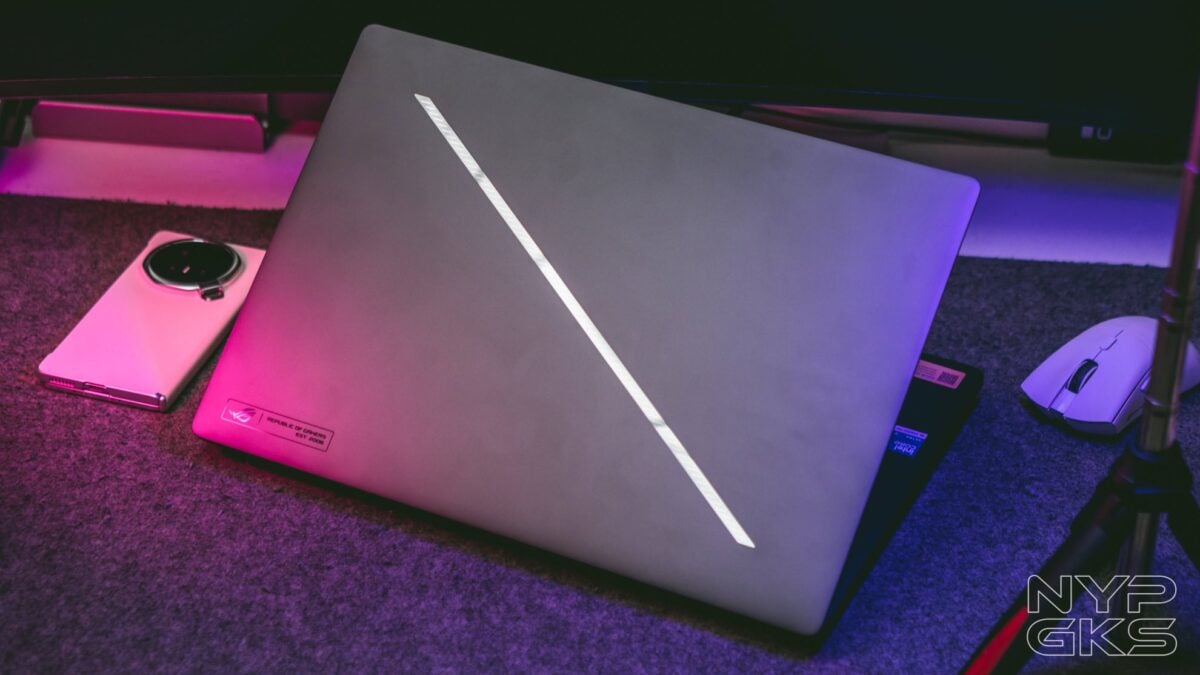
The Zephyrus G16 takes a much more understated approach. Yet despite its low-key appearance, it still manages to stand out largely thanks to the Slash Lighting array on the lid.
The Slash Lighting features 35 distinct zones with a mirror-glass finish, giving the otherwise minimalist chassis a distinctive gaming identity.
It’s customizable through Armoury Crate, with 15 pre-loaded animations, including Battery Status and charging modes.
The Slash Lighting looks particularly striking against the dark matte finish of our review unit. The Zephyrus G16 is available in Eclipse Gray, as seen here, as well as Platinum White.
Build quality is equally impressive. The chassis is made from 100% CNC-machined aluminum alloy and goes through 12 manufacturing processes, resulting in a premium feel that is immediately noticeable.
The large palm rest provides plenty of room for comfortable gaming and typing, while ASUS’ advanced EasyLift Hinge makes it easy to open the laptop with just one finger.
And all of that hardware is packed into an exceptionally slim chassis measuring just 1.49cm thick and weighing only 1.85kg.
For a machine capable of this level of performance, that’s remarkably portable.
Big battery, great keyboard, large touchpad, loads of ports
A powerful laptop needs a substantial battery, and the Zephyrus G16 delivers with a 90Wh battery — a particularly impressive capacity considering just how thin the machine is.
Our review unit also came with two chargers. There’s a compact 100W USB-C charger that’s ideal for travel, alongside a more powerful 250W AC adapter that remains relatively compact and uses ASUS’ Slim Power Jack.
The keyboard is another highlight. It feels smooth and tactile, while its quiet operation — rated at less than 30dB — makes it suitable for both gaming and productivity. It also features N-key rollover for reliable input registration during intense gaming sessions.
Then there’s the large touchpad, which feels smooth and responsive while scrolling and navigating through Windows. In a pinch, it’s even usable for gaming if you happen to leave your mouse at home.
Connectivity is another area where ASUS clearly didn’t want users reaching for a dongle.
On the left side, you get the ASUS Slim Power Jack, a full-size HDMI 2.1 port, USB-A 3.2 Gen 2, USB-C Thunderbolt 4 with DisplayPort 2.1 and Power Delivery 20V/5A, and a 3.5mm mic/headphone jack.
The right side houses another USB-C 3.2 Gen 2 port with DisplayPort 2.1 and Power Delivery 20V/5A, a USB-A 3.2 Gen 2 port, and an SD card reader supporting UHS-II and speeds of up to 312Mbps.
For photographers and videographers, that last addition is particularly useful. You can transfer large media files without having to carry an external card reader or adapter.
Power without the usual compromises
The ASUS ROG Zephyrus G16 is a compelling demonstration of just how far gaming laptops have come.
It combines the performance expected from a high-end gaming machine with the design, display quality, portability, acoustics, and connectivity you’d typically associate with a premium productivity laptop.
This laptop is powerful enough for triple-A gaming, color-accurate enough for creative work, quiet enough to use in public, and slim enough to carry around without feeling like you’re lugging around a desktop replacement.
In other words, the Zephyrus G16 doesn’t force you to choose between performance and portability. It simply gives you both.
The ASUS ROG Zephyrus G16 2026 is now available in stores nationwide. It comes with a free ROG Strix Impact Mouse, ROG Sleeve, three months of Xbox Game Pass, Lifetime Office Home 2024 access, one year of Microsoft 365 Basic with 100GB cloud storage, and one year of up to 700GB ASUS Cloud Storage.
It also comes with the ASUS No. 1 Quality and Service Package, which includes three years of international and local warranty, access to more than 90 service countries and over 100 local service centers and drop-off points, one year of local accidental damage protection, six free device-cleaning claims for preventive maintenance, and a 14-day return policy upon purchase activation.
ASUS is also running a back-to-school promo until September 15 through its ASUS No.1 Quality, Back-to-School Promo.