
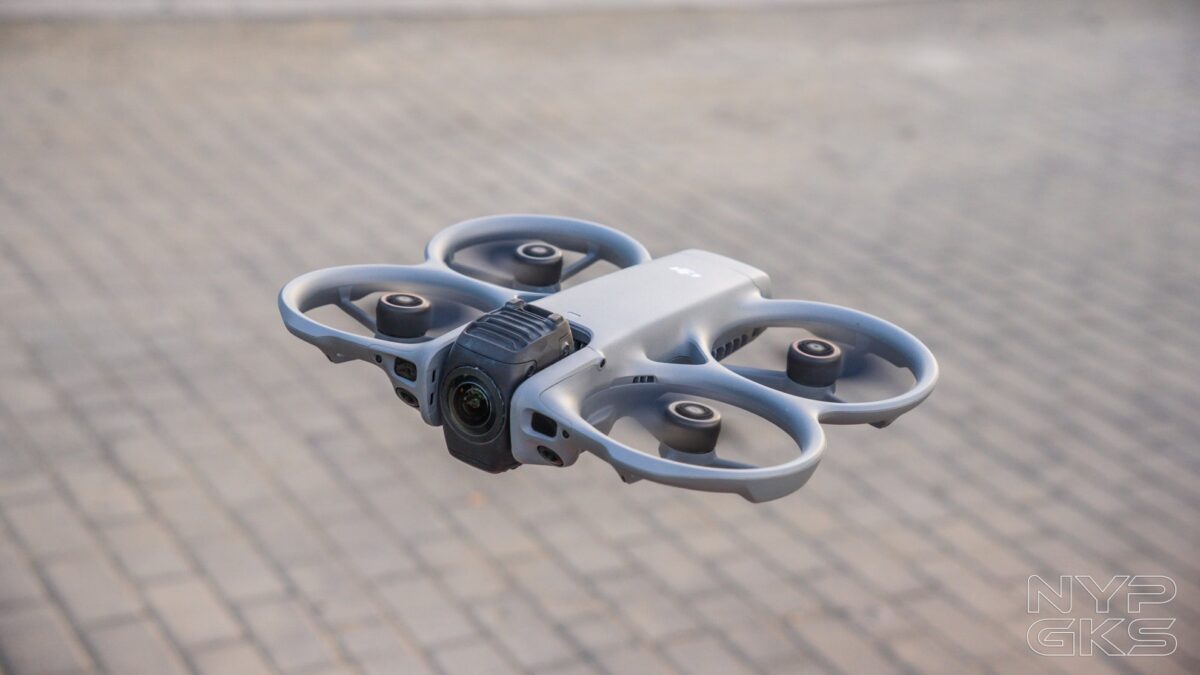
There’s no denying that DJI has been one of the most innovative brands in the world of tech. Their genius is evident in how they’ve transitioned from catering primarily to enthusiasts to reaching the mainstream market. The new DJI Avata 360 is another testament to that.
The DJI Avata 360 is one of the very first drones to feature a 360-degree camera. And honestly, we think that’s where a 360-degree camera makes the most sense.
Having the freedom to frame a shot after it’s been captured is especially useful in drone usage, particularly for beginners. As relative newcomers ourselves, we were excited to check it out.
With that said, here’s our DJI Avata 360 review.
DJI Avata 360 Specs
- 2x 1/1.1-inch Square CMOS sensor, 64 megapixels
- 7.8mm lens, f/1.9, 200-degree FOV
- ISO: 100-12800, 100-25600
- Shutter Speed: 1/8000-1/25s, 1/8000-1/30s
- 360-degree Photo and Video modes
- JPEG/DNG RAW
- 2.7K, 4K, 6K, 8K video resolution
- 120/100/60/50/48/30/25/24fps
- 4500m max altitude
- Descent Speed: 1.5m/s (Cine mode), 6m/s (Normal mode), 10m/s (Sport mode)
- Horizontal Speed: 6m/s (Cine mode), 16m/s (Normal mode), 18m/s (Sport mode)
- GPS, GALILEO, BDS
- 43GB internal storage
- Single-axis mechanical gimbal (tilt)
- Omnidirectional vision system, LiDAR, IR sensors
- O4+ Video Transmission
- WiFi 6, Bluetooth 5.4
- Dimensions: 246 x 199 x 55.5mm
- 2700mAh removable battery
Design and Build Quality
The DJI Avata 360 has a compact and confidence-inspiring design. And we say “confidence-inspiring” because it doesn’t feel fragile, as you can carry and store it almost anywhere without worrying about damaging it.

It features an integrated propeller guard to keep both the propellers and your fingers safe.
Since it uses a 360-degree camera, it doesn’t require a traditional gimbal system. That means fewer moving parts. However, the cube-shaped camera module does flip vertically to switch between 360-degree and single-lens modes.
The camera module is securely protected by the included U-shaped lens guard. Just make sure the module is oriented correctly — with the DJI Avata 360 logo facing up — before attaching the guard.
The DJI Avata 360 drone itself is made of lightweight yet durable plastic, with a matte, textured finish that resists smudges. This is similar to the material used on its accessories.
One thing we would’ve liked to see is some level of water resistance, maybe at least an IP54 rating for minor splashes. For now, make sure to fly only in clear conditions, as even light rain could possibly damage the drone.
Accessories and Controllers
The DJI Avata 360 comes with a solid set of accessories. The most basic option is the DJI RC 2 controller, which features removable joysticks, 32GB of built-in storage, and a lightweight, ergonomic design at just 420g.
It has two retractable 2T4R antennas, a slider for switching between shooting modes, and a large 5.5-inch touchscreen with FHD (1920 x 1080) resolution and 700-nit peak brightness.
It uses DJI’s O4 video transmission system, supporting 2.4GHz / 5.1GHz / 5.8GHz bands with a range of up to 20km.
The RC 2 controller performed well, even for beginners like us. We appreciated the large, sharp display, the intuitive layout of buttons and dials, and its comfortable ergonomics.
Range is generally reliable, although signal choppiness and delay become noticeable when flying beyond buildings or large structures. DJI notes that in areas with strong interference, the range may drop to around 1.5km to 4km.
When the drone runs out of storage, you can record directly to the controller, though quality is capped at only single-lens and 1080p.
If you’ve gained enough experience, you can switch to the DJI Goggles N3 and DJI RC Motion 3 controller combo. This setup unlocks the Avata 360’s full speed and maneuverability.
The Goggles N3 are relatively lightweight at 536g and easy to use. We also appreciate that they’re eyewear-friendly, as we were able to wear prescription glasses comfortably underneath.
In terms of specs, each display measures 3.5-inches with a resolution of 1920 x 1080 and 60Hz refresh rate. It supports up to 512GB microSD cards, uses the same O4 transmission system, and is powered by a 2,450mAh Li-ion battery rated for up to 2.7 hours of use.
Like the other accessories, it charges via USB-C.
The Goggles N3 work in tandem with the DJI RC Motion 3. This controller uses motion sensors, allowing you to pilot the drone at high speeds and perform acrobatic maneuvers with precision.
It features a minimal but functional layout: an accelerator trigger, FN dial for settings, shutter/record button, emergency brake and hover button, altitude joystick, and a flight mode switch.
It’s extremely lightweight at just 118g, includes a wrist strap, and connects to the Goggles N3 to transmit control signals. It also has a built-in 2,600mAh battery rated for up to 10 hours.
The Goggles N3 and RC Motion 3 are excellent for advanced users. Beginners may want to skip this combo initially to avoid accidents. A dedicated carrying case for the Goggles N3 would also be nice.
One of the most useful accessories is the DJI Avata 360 Charging Hub. While battery life is decent (more on that later), you’ll want at least three batteries for larger projects.
It supports parallel charging (with at least a 65W charger), allowing all batteries to charge simultaneously. With slower chargers, it prioritizes the battery with the highest charge level. Unfortunately, no charger is included.
Also worth mentioning are the customizable sling bag — which fits almost everything except the Goggles — and the included bright orange landing pad.
Hardware
The DJI Avata 360 is equipped with two 1/1.1-inch CMOS sensors, each with 64 megapixels. It features a 200-degree field of view, a 7.8mm equivalent focal length, a 2.5mm actual focal length, and an f/1.9 aperture.
Because of the 360-degree camera system, it doesn’t rely on a traditional gimbal. It also includes 42GB of built-in storage, enough for roughly 30 minutes of 360-degree footage.
For navigation and safety, it uses an omnidirectional vision system with forward-facing LiDAR and a downward-facing infrared sensor.
It supports O4+ video transmission with a maximum bandwidth of 40MHz and features a 4-antenna (2T4R) system. Connectivity includes Wi-Fi 6, Bluetooth 5.4, microSD card support, and a USB-C port.
The drone has a maximum speed of 18m/s (around 64.8km/h) in Sport mode — fast enough to keep up with motorcycles or even cars. For most scenarios, Cine mode at 6m/s (21.6km/h) is more than sufficient for smooth, cinematic shots.
It uses a 2,700mAh Intelligent Flight Battery with a built-in indicator. The battery button doubles as the power button: press once to check the charge, double-press to power on.
Overall, the DJI Avata 360 feels like a well-rounded drone with all the right hardware.
Camera/Video Quality
Image quality is similar to that of a typical 360-degree camera, such as the DJI Osmo 360. It’s not exceptional, but usually more than good enough for most use cases. Stitching between the two lenses is noticeable, especially at lower altitudes, and low-light performance is not that good.
8K recording is limited to 360 mode, and there’s a clear drop in quality when digitally zooming. That’s expected, but the footage it’s still usable. See some of the video samples below:
The ability to reframe shots after capturing them is where the Avata 360 truly shines. Both beginners and enthusiasts will appreciate this flexibility.
For newcomers, it provides peace of mind. You can simply fly near your subject and fine-tune the framing later, without needing precise positioning during flight. Of course, correct positioning is still important, but the added flexibility is a huge plus.
If you want to minimize editing time, you can use ActiveTrack 360, which worked incredibly well. Just tap the tracking icon on the controller, select a subject (or mark your own), and let the drone follow it. This is pretty useful even during simple flight paths.
Forgot to enable tracking? No problem. You can apply the same tracking in post using the DJI Studio app.
At its core, the DJI Avata 360 prioritizes flexibility over outright image quality. While we’d like to see improved sensors in future versions, the versatility it offers is highly commendable.
Battery and Charging
The DJI Avata 360 uses a 2,700mAh Li-ion Intelligent Flight Battery, with a claimed maximum flight time of around 23 minutes.
In our testing, this estimate was fairly accurate. However, battery drain increases significantly in strong winds, as the drone works harder to maintain stability.
Charging can be done directly via the drone’s USB-C port, with support for up to 65W input. A full charge takes approximately 73 minutes.
Using the charging hub, you can go up to 100W, reducing charge time to around 47 minutes per battery, or about 100 minutes for three batteries. When not connected to power, the hub also charges one battery and fills it up using the other batteries.
Verdict
The DJI Avata 360 is truly one of a kind. While there are only a few drones with a 360-degree camera, this one stands out with its compact design and wide range of accessories.
As beginners, we especially appreciate how the 360-degree camera makes reframing shots in post incredibly easy. It gave us the freedom to fly without worrying too much about perfect framing during capture.
We’re also impressed with the variety of controllers and accessories DJI offers, along with the intuitive interface across the controllers, mobile app, and PC software. Battery life is solid as well.
That said, it’s not perfect. We’d like to see a better sensor, improved stitching, built-in training modes for the Goggles and Motion Controller, and some level of water resistance in the next version.
Still, the DJI Avata 360 is one of the most innovative drones on the market today. It’s a big step up compared to other affordable drones, and it’s something that both beginners and experienced users will surely appreciate.
DJI Avata 360 pricing and availability in the Philippines
The DJI Avata 360 (RC2 controller, 3x smart batteries, charging hub, shoulder bag) has a price of Php38,290, while the Fly More Combo with an additional DJI Goggle N3 and RC2 Motion Controller is available for Php47,890.
Pros
- 360-degree lens provides framing flexibility
- Convenient, compact design
- Fast acceleration, stable at strong winds
- Integrated propeller guards, lens protection
- Solid controller, accessory options
- Good battery life
- Good interface and PC/mobile app
Cons
- Image quality could be better, noticeable stitching
- Light water protection would be nice
- Training courses for the Goggles, Motion controller would be useful
- No dedicated case for the Goggles
Son günlerde mahalledeki eski binaların yıkım sürecini izlerken ister istemez kendi yaşadığım yerin güvenliğini düşünmeye başladım. Süreç hem çok yavaş ilerliyor hem de insanı biraz geriyor, acaba benzer durumlarla karşılaşanlar nasıl bir yol izledi? [hinbijvdwcodufnsuy]
lutwdg
vhvmnn
l42gdz