
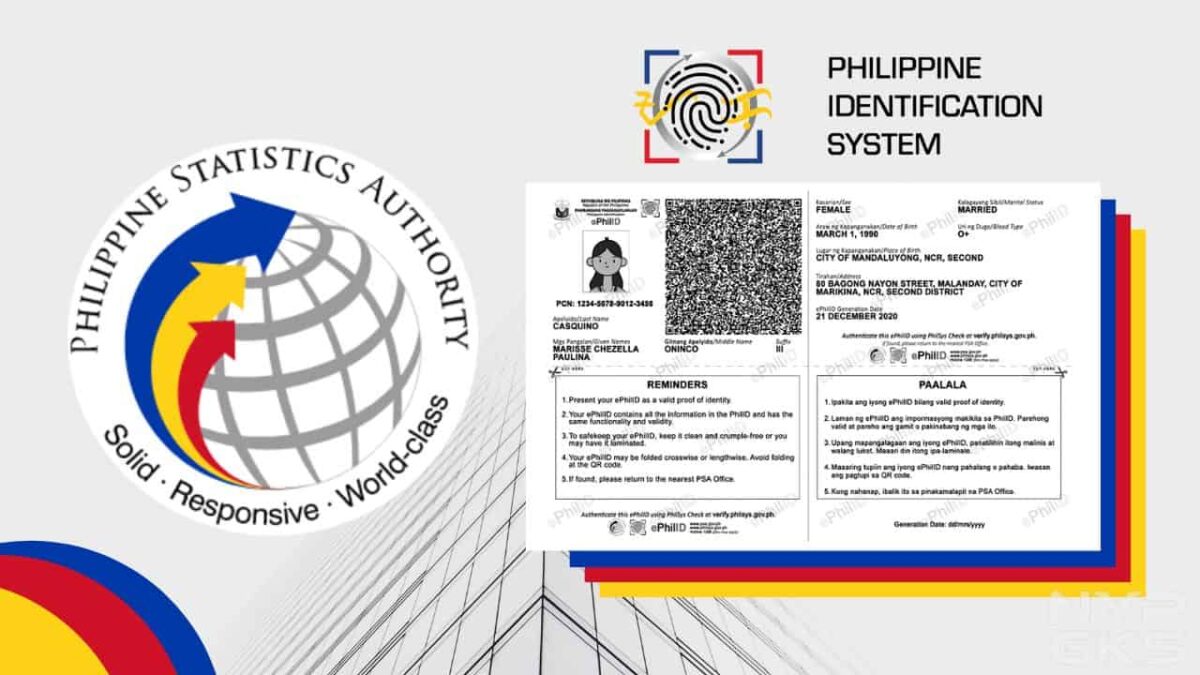

It’s been more than a year since the registration for the PhilSys National ID opened. Since then, millions of Filipinos have registered to get one. However, this also means that tons of them are still waiting to have their physical cards delivered.
If you’re still waiting but already really need it, PhilSys has launched a way for you to get a National ID digital or printed copy. It is called the Electronic Philippine ID or ePhilID.
We’ll be showing you all the details about the digital or printed copy of the National ID and the steps for getting one. Let’s start.

Table of Contents
- Who are eligible to get National ID digital, printable copy?
- Is the ePhilID or digital National ID valid?
- How to get a digital or printable PhilSys National ID (ePhilID)?
- How to track the delivery of my National ID?
Who are eligible to get National ID digital, printable copy?
In a public advisory released on October 5, the Philippine Statistics Authority (PSA) said that this alternative is available for those who have already registered for their National ID and are just waiting for their actual physical ID to be delivered. This way, they can already enjoy the benefits of having one while waiting for the physical card.
Is the ePhilID or digital National ID valid?
The PSA said that the ePhilID is enough to be used as valid and sufficient proof of identification. Business and government entities, as well as the holders themselves, can verify the ID by following these steps.
Where can I use the ePhilID?
You can practically use the ePhilID on any transaction, whether it’s with the government or private entities. The Philippine Statistics Authority officially said that it can be used on:
- All national government agencies
- Local government units (LGUs)
- Government-owned and controlled corporations (GOCCs),
- Government financial institutions (GFIs)
- Financial institutions
- Private sector
How to get a digital or printable PhilSys National ID (ePhilID)?
Step 1: First, make sure you have already registered to receive a National ID or you have a PhilSys Number (PSN).
Step 2: Make an online appointment on the PhilSys website, which you can access here: https://trn-verifier.philsys.gov.ph. Scroll down and click the checkbox on the privacy notice then click “Next”.

Step 3: Type your transaction reference number, which you can find on the transaction slip handed to you during the registration process.

Step 4: Type the required information like your name, PSN, email address, and contact number.
Step 5: Pick your preferred registration center, date, and time for claiming.
Step 6: Wait for the email confirmation.
Step 7: Go to your chosen registration center on the set date and time and present your transaction slip. Once received, you shall be handed a printed copy of your ePhilID.

Step 8: Now that you have your printed copy, visit the PhilSys Check website and scan the QR code on your printed copy to authenticate it. This process is also done once you receive the actual ID card.
Where can I find the PhilSys transaction number?
You can find the transaction number on the transaction slip that was given to you after you completed the registration process. It is located right below your name.

What are the details included on the ePhilID?
The ePhilID or the printable version of the National ID has tons of personal information that are enough to make it a valid proof of identification. The list of displayed information is listed below.
- Full name
- PhilSys Number (PSN)
- Sex
- Date of birth
- Blood type
- Marital status
- Front-facing photo
- Address
- Generation data
- QR code
How to track the delivery of my National ID?
Now that you have a printed copy, it’s still best to have the actual card. While waiting for it, here’s how you can track the delivery status of your National ID.
These are everything you need to know about getting your Electronic Philippine National ID from PhilSys.
I believe this web site has some really wonderful info for everyone : D.
Great blog here! Also your site loads up very fast! What web host are you using? Can I get your affiliate link to your host? I wish my website loaded up as fast as yours lol
I think everything posted made a ton of sense.
But, what about this? suppose you were to create a awesome headline?
I am not saying your content is not good., however what if you added
a headline that makes people want more? I mean How to get PhilSys National ID digital and printed copy | NoypiGeeks is kinda
vanilla. You could peek at Yahoo’s front page and note
how they write post headlines to get people to click.
You might try adding a video or a related pic or two to get
readers interested about everything’ve got to say. In my opinion, it would make your posts a little
livelier.
Howdy, a helpful article for sure. Thank you.
It’s clear you’re passionate about the issues.
I don’t normally comment but I gotta say appreciate it for the post on this one : D.
Pretty impressive article. I just stumbled upon your site and wanted to say that I have really enjoyed reading your opinions. Any way I’ll be coming back and I hope you post again soon.
fantastic internet site, I could definitely go to your web page once more…acquired some really nice info.
How long have you been in this field? You seem to know a lot more than I do, I’d love to know your sources!
The clarity in your post is just nice and I can tell you are an expert in the subject matter.