
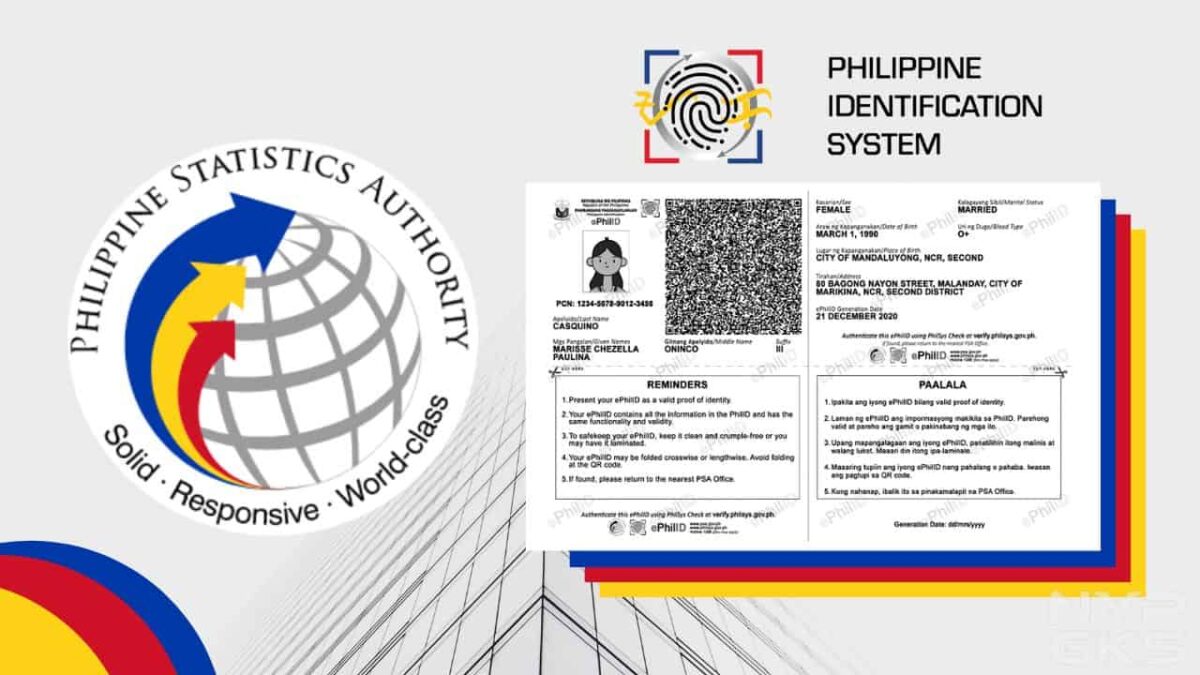

It’s been more than a year since the registration for the PhilSys National ID opened. Since then, millions of Filipinos have registered to get one. However, this also means that tons of them are still waiting to have their physical cards delivered.
If you’re still waiting but already really need it, PhilSys has launched a way for you to get a National ID digital or printed copy. It is called the Electronic Philippine ID or ePhilID.
We’ll be showing you all the details about the digital or printed copy of the National ID and the steps for getting one. Let’s start.

Table of Contents
- Who are eligible to get National ID digital, printable copy?
- Is the ePhilID or digital National ID valid?
- How to get a digital or printable PhilSys National ID (ePhilID)?
- How to track the delivery of my National ID?
Who are eligible to get National ID digital, printable copy?
In a public advisory released on October 5, the Philippine Statistics Authority (PSA) said that this alternative is available for those who have already registered for their National ID and are just waiting for their actual physical ID to be delivered. This way, they can already enjoy the benefits of having one while waiting for the physical card.
Is the ePhilID or digital National ID valid?
The PSA said that the ePhilID is enough to be used as valid and sufficient proof of identification. Business and government entities, as well as the holders themselves, can verify the ID by following these steps.
Where can I use the ePhilID?
You can practically use the ePhilID on any transaction, whether it’s with the government or private entities. The Philippine Statistics Authority officially said that it can be used on:
- All national government agencies
- Local government units (LGUs)
- Government-owned and controlled corporations (GOCCs),
- Government financial institutions (GFIs)
- Financial institutions
- Private sector
How to get a digital or printable PhilSys National ID (ePhilID)?
Step 1: First, make sure you have already registered to receive a National ID or you have a PhilSys Number (PSN).
Step 2: Make an online appointment on the PhilSys website, which you can access here: https://trn-verifier.philsys.gov.ph. Scroll down and click the checkbox on the privacy notice then click “Next”.

Step 3: Type your transaction reference number, which you can find on the transaction slip handed to you during the registration process.

Step 4: Type the required information like your name, PSN, email address, and contact number.
Step 5: Pick your preferred registration center, date, and time for claiming.
Step 6: Wait for the email confirmation.
Step 7: Go to your chosen registration center on the set date and time and present your transaction slip. Once received, you shall be handed a printed copy of your ePhilID.

Step 8: Now that you have your printed copy, visit the PhilSys Check website and scan the QR code on your printed copy to authenticate it. This process is also done once you receive the actual ID card.
Where can I find the PhilSys transaction number?
You can find the transaction number on the transaction slip that was given to you after you completed the registration process. It is located right below your name.

What are the details included on the ePhilID?
The ePhilID or the printable version of the National ID has tons of personal information that are enough to make it a valid proof of identification. The list of displayed information is listed below.
- Full name
- PhilSys Number (PSN)
- Sex
- Date of birth
- Blood type
- Marital status
- Front-facing photo
- Address
- Generation data
- QR code
How to track the delivery of my National ID?
Now that you have a printed copy, it’s still best to have the actual card. While waiting for it, here’s how you can track the delivery status of your National ID.
These are everything you need to know about getting your Electronic Philippine National ID from PhilSys.
Hello, I think your blog might be having browser compatibility issues. When I look at your website in Chrome, it looks fine but when opening in Internet Explorer, it has some overlapping. I just wanted to give you a quick heads up! Other than that, awesome blog!
Unquestionably believe that which you said. Your favorite reason seemed to be on the net the easiest thing to be aware of. I say to you, I certainly get annoyed while people consider worries that they plainly don’t know about. You managed to hit the nail on the head. Will probably be back to get more. Thanks
I favored your idea there, I tell you blogs are so helpful sometimes like looking into people’s private life’s and work.At times this world has too much information to grasp. Every new comment wonderful in its own right.
I love what you’ve created here, this is definitely one of my favorite sites to visit.
Wow, amazing blog layout! How long have you been blogging for? you made blogging look easy. The overall look of your site is great, as well as the content!
Oh my goodness! an amazing article. Great work.
Loving the info on this website , you have done outstanding job on the blog posts.
I found your blog through google and I must say, this is probably one of the best well prepared articles I have come across in a long time. I have bookmarked your site for more posts.
You need to really control the comments listed here
Thanks for sharing the information. I found the information very useful. That’s a awesome story you posted. I will come back to scan some more.