
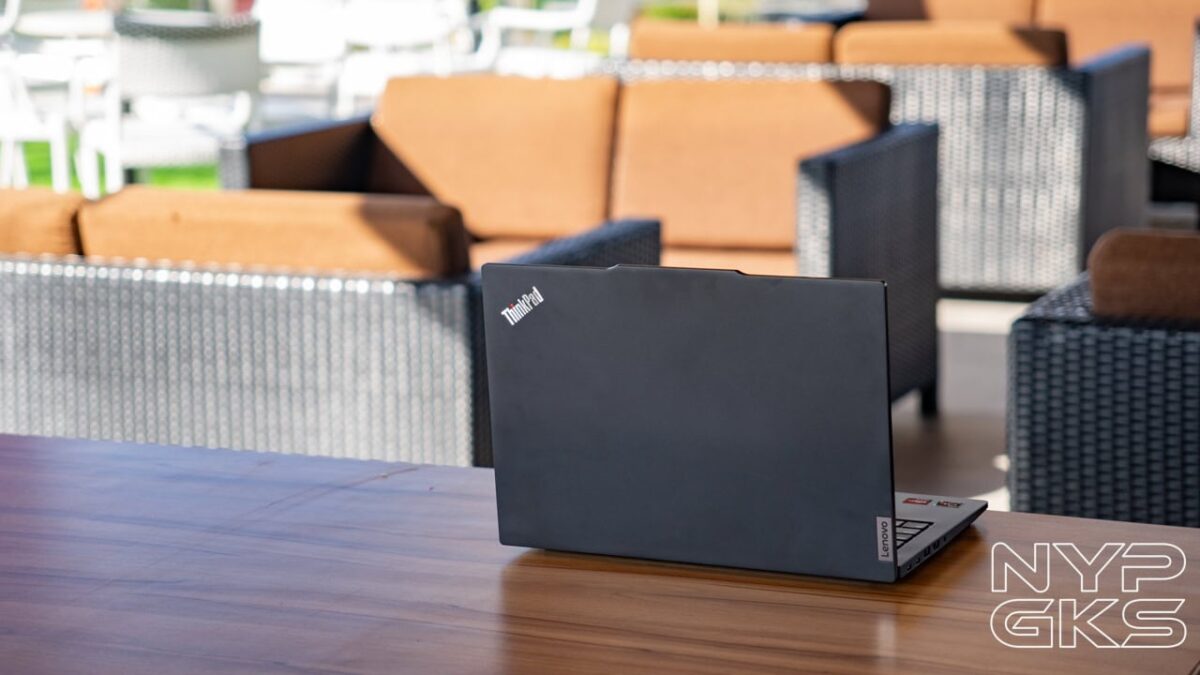
The ThinkPad is prominent in the business world. Lenovo clings to that and continues to polish the series, rather than making substantial upgrades, to not alienate its long-time users.
Lenovo has used the same mold with the new Lenovo ThinkPad E14 Gen 6. It has many classic features of a ThinkPad, right from the design to the iconic TrackPoint that’s been a staple of the series for years.
But does this machine still have a place in the modern age? That’s what we’ll find out in our ThinkPad E14 Gen 6 review.
Lenovo ThinkPad E14 Gen 6 Specs
- Windows 11 Pro
- 14-inch WUXGA IPS display, 1920 x 1200 pixel resolution, ~166ppi
- AMD Ryzen 5 7535U CPU, 12 cores, 2.9GHz
- Radeon 660M Graphics
- 16GB RAM (2x 8GB), DDR5 4800MHz
- 512GB SSD M.2 PCIe Gen 3
- 720p HD webcam, privacy shutter
- Harman-tuned 2x 2W stereo speakers, Dolby Atmos
- Backlit keyboard
- ThinkPad Trackpoint
- WiFi 6E, 2×3, AX
- Bluetooth 5.3
- 1x USB-C (Thunderbolt 4, 40Gbps, PowerDelivery, DisplayPort 2.1)
- 1x USB-C (20Gbps, PowerDelivery 3.0, DisplayPort 1.4)
- USB-A (10Gbps)
- USB-A (5Gbps)
- Ethernet RJ45
- HDMI 2.1 (support for 4K@60Hz)
- Headphone/mic combo
- Dimensions: 18.59 x 313 x 219.3mm
- Weight: 1.42kg
- Colors: Graphite Black, Arctic Grey
- 57Whr 3-cell Li-Po battery, 65W USB-C adapter
Design and Build Quality
The overall look and feel of this modern ThinkPad are reminiscent of the classic models from years ago. However, the particular chassis of the ThinkPad E14 G6 is fairly new and was first introduced from its predecessor.

It has a nice black aluminum outer lid that looks clean and would take the beating from your day-to-day commute to and from the office. With its MIL-STD-810H certification, it guarantees that it could survive extreme conditions regardless of where you work.
What I didn’t like about it is that its shiny base, palm rest, and trackpad attract smudges easily and wiping them takes some effort.
The bottom is raised high enough for cooling via the wide rubber feet that also keep it stable on any surface. We also have ventilation on top of the keyboard with good clearance.
Overall, I’m impressed with the durability, even with the sturdy hinge that lets you open the lid up to 180 degrees. Everything about its design just works, from the display size, the keyboard layout, and the ample size of the trackpad. I would have preferred a bigger trackpad like the one in the MacBooks, but this size is good enough, too.
The ThinkPad E14 Gen 6 is also fairly portable thanks to its small size, but it’s far from being the thinnest or the lightest laptop in the market today.
Taking a tour, we have the 14-inch IPS screen on the front, with a notch for the 720p webcam, a physical privacy shutter, and dual microphones. Bezels are not the thinnest, but acceptable.
Behind the screen is the lid that has the ThinkPad logo on the top left. The red dot on the letter “i” lights up when the device is powered on. We then have the Lenovo badge at the bottom right side.
There’s plenty of ports on the left side. The USB-C port comes with an LED light indicator and supports up to 20Gbps of transfer speeds, Power Delivery 3.0 for charging, and DisplayPort 1.4.
Next to it is a more powerful USB-C Thunderbolt 4 with 40Gbps speeds and the same PD and DP 2.1. We also have a USB-A port with 10Gbps speeds, HDMI 2.1 (up to 4K@60Hz), and a 3.5mm headphone/mic combo jack.
The Kensington Security Lock is located on the other side, next to the RJ45 Ethernet port, and a slower USB-A with 5Gbps support.
A power button is on the right side of the keyboard, with an LED light on top of it. Unfortunately, the variant we reviewed didn’t have a fingerprint scanner. There’s another ThinkPad badge on the bottom right corner.
Trackpad, TrackPoint, Keyboard, Webcam
The keyboard and trackpad situation on the Lenovo ThinkPad E14 Gen 6 feels foreign if you’re new to the series. There’s a steep learning curve you need to get into, from how to utilize the TrackPoint to the odd placement of the CTRL button. But as stated earlier, Lenovo didn’t want to alienate its long-time users, and that’s commendable.
Personally, I was really annoyed by the CTRL button’s placement (switched with the Fn button), and you might be too if you’re new to the series.
The keyboard is really nice to type on. They are tactile, provide a clicky sound, have a nice rough texture for good grip, and have the usual cap sizes. To be honest, I find the TrackPoint useless for most of my use cases, but it’s there for those who have grown to using it.
The trackpad is nice, albeit it could be a bit larger. There are still buttons on top of it, which I surprisingly adapted to quite easily.
Meanwhile, the 720p webcam has terrible image quality, but it should be enough for online meetings and presentations. It has a physical privacy shutter and two microphones on each side to pick up your voice with good clarity.
Display and Audio
The Lenovo ThinkPad E14 Gen 6 has a compact 14-inch WUXGA IPS display, with a 1920 x 1200 pixel resolution, ~161ppi, 300-nit peak brightness, 45% NTSC, and has an anti-glare coating.
Display quality is nothing to write home about. It’s great for multitasking and productivity, but the colors are lackluster for heavy photo/video editing. You can still enjoy films and TV series, but don’t expect eye-watering image quality.
I really appreciated the matte coating and good viewing angles. I was able to comfortably work outdoors without worrying about reflections ruining my experience.
For audio, the bottom-firing stereo speakers are surprisingly good. Not great, but good enough. Treble and bass are nice and clear, and the volume is ample for solo listening.
Hardware and Performance
The Lenovo ThinkPad E14 Gen 6 is powered by an AMD Ryzen 5 7535U processor, with 6 cores, 12 threads, 4.55GHz clock speed, and 16MB L3 cache. It has AMD Radeon 660M graphics, 16GB SODIMM DDR5-4800 RAM, and 512GB of storage.
Lenovo ThinkPad E14 Gen 6 Benchmark Scores
Performance has been satisfactory, especially if you’re just dealing with emails, Word documents, and spreadsheets. During our time with it, we spent hours working with multiple Chrome tabs open while writing articles, researching, and editing photos on Canva. It can also comfortably run Adobe Photoshop and edit videos using Davinci Resolve. Plus, it stays relatively quiet without major overheating issues.
We also tried playing GTA Online just to test it out and got acceptable frame rates under low to medium graphics settings at 1080p. It’s really not meant for gaming, but it’s good to know that it can run decently in case you want to play old and casual games.
Battery and Charging
The Lenovo ThinkPad E14 Gen 6 Review has a 3-cell 56WHr Li-Po battery with 65W USB-C charging.
In our test, it was able to last for 7.5 hours of intermittent use. We primarily did work with it, handling multiple browser windows and tabs open. That’s a fairly decent longevity for a non-ARM laptop.
Charging speeds was decent, too, but nothing to brag about. A full charge took about 1 hour and 40 minutes in our tests.
Verdict
The Lenovo ThinkPad E14 Gen 6 is a solid option for those who want a reliable machine for work, especially if you’re a long-time ThinkPad user who can’t live without the TrackPoint and has grown a liking to its specific design, keyboard layout, and trackpad.
But if you don’t really need to own a ThinkPad, there are other options out there. Options that will let you work better with their bigger screens, sleeker designs, and the incredible efficiency and battery life provided by ARM chips. Of course, that’s if your work software is compatible with them. Otherwise, sticking with x86 is the safer choice for now.
Lenovo ThinkPad E14 Gen 6 pricing and availability in the Philippines
The Lenovo ThinkPad E14 Gen 6 is available in Lenovo stores both online and offline, and in tons of retailers nationwide. It has a starting price of Php61,800 on the company’s official website.
Pros
- Solid build quality
- Familiar TrackPoint and Trackpad design for long-time users
- Good performance for work, day-to-day tasks
- Surprisingly decent gaming performance
- Flexible port selection
Cons
- Odd CTRL key placement
- So-so display and speakers
- Fingerprint and dust magnet
- Terrible webcam quality
The site combines a huge game library with a clean, modern interface.
True Fortune offers an extensive range of slots covering every theme and volatility level.
New players in the United Kingdom can claim a generous welcome bonus with free spins on their first deposit.
Withdrawals are handled quickly, with e-wallet payouts often completed the same day.
Certified RNG technology ensures every spin and hand is completely random.
true fortune casino no deposit promo codes [url=https://true-fortune-casino26.com/no-deposit-bonus/]true fortune casino no deposit promo codes[/url]
New users can check the FAQ for quick guidance on bonuses and payments.
The casino welcomes players from the United Kingdom with a localised experience and responsive support.
The lobby showcases jackpot slots and the latest releases right at the top.
Players enjoy recurring promotions including cashback and free spins on selected slots.
Withdrawals are handled quickly, with e-wallet payouts often completed the same day.
The casino is licensed and applies strong security to keep accounts and funds safe.
A 24/7 support team helps players in the United Kingdom through live chat and email.
true fortune $25 free spins no deposit [url=true-fortune-casino27.com/free-spins]true fortune $25 free spins no deposit[/url]
The official True Fortune website brings hundreds of games together on a single, easy-to-use platform.
The lobby showcases jackpot slots and the latest releases right at the top.
A loyalty programme rewards active players with points that convert into real bonuses.
Deposits and withdrawals can be made with cards, e-wallets and bank transfer.
All games run on certified random number generators for provably fair results.
Help is always at hand thanks to round-the-clock live chat support.
true casino [url=https://www.true-fortune-casino27.com]true casino[/url]
Designed with players in the United Kingdom in mind, the site keeps registration and play simple.
A dedicated live casino streams real-dealer roulette, blackjack and baccarat around the clock.
The promotions page lists reload bonuses, tournaments and cashback offers.
true fortune casino no deposit code [url=https://www.true-fortune-casino23.com/no-deposit-bonus]true fortune casino no deposit code[/url]
The casino accepts a range of payment options familiar to players in the United Kingdom.
Fair play is guaranteed by independently tested RNG games with published RTP rates.
Customer support is available around the clock via live chat and email in English.
In the United Kingdom, True Fortune casino stands out as a trusted online gambling destination.
Players can choose from a vast slot collection powered by top studios such as Microgaming and Yggdrasil.
The promotions page lists reload bonuses, tournaments and cashback offers.
Withdrawals are handled quickly, with e-wallet payouts often completed the same day.
Player information is protected with encryption and strict data-handling standards.
New users can check the FAQ for quick guidance on bonuses and payments.
true fortune promo codes [url=http://www.true-fortune-casino17.com/promocode]true fortune promo codes[/url]
The platform is fully optimised for players in the United Kingdom with English support and local payment options.
True Fortune offers an extensive range of slots covering every theme and volatility level.
True Fortune greets new users in the United Kingdom with a welcome package that boosts the first deposit.
Topping up an account is instant with no fees on most payment methods.
A valid licence and secure infrastructure make True Fortune a safe place to play.
The site is fully responsive, adapting to any screen size on the go.
true fortune sign up bonus [url=true-fortune-casino27.com/sign-up-bonus]true fortune sign up bonus[/url]
True Fortune casino is one of the most popular online casinos among players in the United Kingdom.
Big-money jackpots and trending games are easy to find on the homepage.
First-time players receive a welcome bonus plus free spins after signing up.
Deposits and withdrawals can be made with cards, e-wallets and bank transfer.
True Fortune operates under an official licence and uses SSL encryption to protect player data.
Clear rules and a well-organised help centre keep everything straightforward.
true fortune casino no deposit free chip [url=true-fortune-casino19.com/free-chips]true fortune casino no deposit free chip[/url]
Everything from slots to live tables is available on the official True Fortune site.
Live blackjack, roulette and game shows are available at any time of day.
The VIP scheme gives loyal users cashback boosts, gifts and a personal manager.
True Fortune supports popular payment methods including Visa, Mastercard and e-wallets like Skrill and Neteller.
Player information is protected with encryption and strict data-handling standards.
Customer support is available around the clock via live chat and email in English.
true fortune casino no deposit [url=https://www.true-fortune-casino27.com/no-deposit-bonus]true fortune casino no deposit[/url]
888starz apk [url=http://www.vetsintez.com]888starz apk[/url]
Users can obtain the apk file and install it on an Android device without hassle.
Before installing the apk on Android, allow installation from external sources.
The 888starz app for Android delivers fast performance and a smooth, mobile-optimized interface.
The permissions requested by the app should be reviewed before completing installation.
The iOS version delivers a smooth, stable experience matching the Android edition.
The app has a small size that does not take up much phone memory.
The installation takes only a few minutes until the app is ready to use.
The Android version of the 888starz app stands out for its speed and comfortable design.
Getting the 888starz apk from a trusted source is preferable to keep the device safe.
Installing the app on iPhone takes only a few simple, quick steps.
888starz [url=https://sodibet.com]888starz apk[/url]